Archive your SAP documents in SharePoint
The CaRD Connector makes Microsoft SharePoint the secure home for your SAP documents — via SAP ArchiveLink and the open CMIS standard. Out of the box, no custom development.
- SAP RISE & S/4HANA ready
- SharePoint Online & on-premise
- Optional AI with Copilot
- No documents leave your tenant
- Standards-based & future-proof



Two connectors. One trusted partner.
Whatever interface your SAP landscape speaks, the CaRD Connector has you covered — and stores everything safely in SharePoint.
ArchiveLink Connector
The proven SAP ArchiveLink interface for classic archiving: inbound and outbound documents, print lists, GOS attachments and SAP DMS — exactly as your users expect.
CMIS Connector
The open CMIS standard for modern, interoperable content services — so any system that speaks CMIS can use SharePoint as its repository, not just SAP.
Built for real-world archiving
Powerful features that work out of the box and stay easy to configure — no developers required for everyday changes.
Business metadata
Pass SAP business data — company code, document number, vendor, customer — straight into SharePoint columns. Configure it by drag & drop, update it in real time or on a schedule.
Folders & structures
Organise your library the way your business thinks — by year, object type, vendor or customer file. Or keep it flat. Fully configurable, no flat-file limits.
Viewing & security
Open documents inside SAP or natively in SharePoint. Use multiple libraries and SharePoint permissions to separate confidential and public content.
Full compatibility
Works with current and earlier SAP releases, SAP Business Objects, SAP DMS/PLM document info records and SAP Fiori — including S/4HANA and backward-compatible scenarios.
Document sets & content types
Native SharePoint Document Sets and Content Types are supported and can be combined with your folder strategy — all driven by your SAP metadata.
Migration support
Moving from another archive or ECM/DMS? We migrate your existing documents and indexes — including system splits, harmonisations and merges.
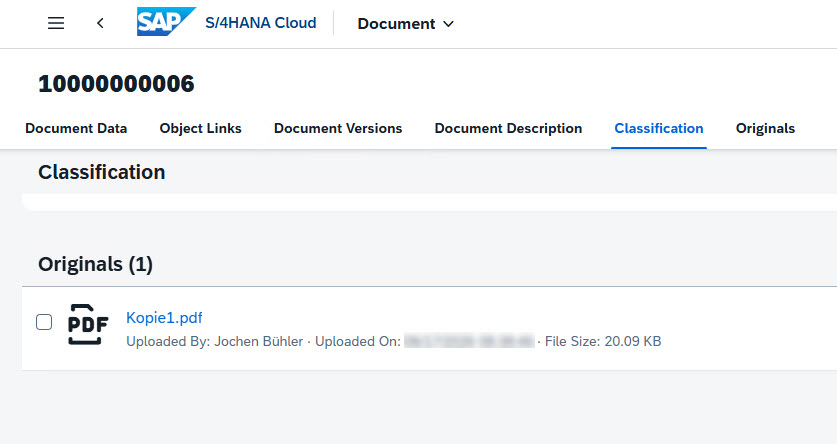
Shown in SAP S/4HANA Cloud — works the same on S/4HANA Private Cloud and SAP ECC. The original is stored in SharePoint, served by the CaRD Connector.
Your SAP files, at home in Microsoft 365
Stop paying for a separate archive. The CaRD Connector stores your SAP documents directly in SharePoint, so they live where your people already work — searchable, secure and governed by Microsoft 365.
- ✓Find documents in both worldsSearch in SAP and in SharePoint — the same file, two front doors.
- ✓Use what SharePoint already gives youVersioning, retention, permissions, eDiscovery and your own lists — no extra archive to maintain.
- ✓Your data stays yoursDocuments remain in your own Microsoft 365 tenant. We store only links and encrypted connection data.
Works with every SAP deployment
RISE, cloud or on-premise — and any other system that speaks ArchiveLink or CMIS.
From idea to archive in three steps
Connect
We link your SAP system to SharePoint through ArchiveLink or CMIS — on-premise, in your Azure tenant or as a managed cloud service.
Configure
Map your SAP business data to SharePoint columns and folders with our drag & drop designer. No custom development.
Archive
Every SAP document lands in SharePoint with its metadata — instantly findable, securely stored and ready for AI when you are.
Services that take the pressure off
A single point of contact for both your SharePoint and SAP questions — whatever module you run.
Consulting
We analyse your requirements and design the cleanest path to connect SAP and SharePoint — on time and on budget.
Setup & support
Short on time? We install and configure the connector for you, then show your team how everything works — your call who runs it.
Custom development
Most needs are covered out of the box. For special cases, we build the plugins and extensions you need — just ask.
SAP expertise since 1994
CaRD Gesellschaft für EDV-Beratung mbH is an SAP partner based in Wiesloch, Germany. Our team of more than 100 consultants and developers delivers SAP solutions, integrations and migrations for customers around the globe.
We built one of the very first ArchiveLink connectors for SharePoint back in 2007. Today our connectors manage millions of documents every day, across every time zone — and we keep them current with the latest SAP, SharePoint and AI capabilities.
- ✓SAP PartnerCertified integration with SAP S/4HANA.
- ✓Microsoft technologyNative SharePoint, Microsoft 365 and Azure.
- ✓Privacy by designNo tracking, no cookies, your documents stay in your tenant.
- ✓Worldwide deliveryProjects and support across all time zones.
Frequently asked questions
Can I use SharePoint as the archive for SAP documents?
Yes. The CaRD Connector turns Microsoft SharePoint — Online, Microsoft 365 or on-premise — into a certified content repository for SAP. Documents created or uploaded in SAP are stored in SharePoint and stay fully accessible from both systems.
Which SAP systems are supported?
RISE with SAP, SAP S/4HANA Private Cloud and Public Cloud, classic on-premise systems and every other SAP system that offers an ArchiveLink or CMIS interface — including earlier releases, GOS attachments, SAP DMS/PLM document info records and SAP Fiori.
Does it support both ArchiveLink and CMIS?
Yes. The CaRD Connector family covers both standards: the proven SAP ArchiveLink interface and the open CMIS standard, so you can connect virtually any system that speaks one of these protocols.
Is artificial intelligence required?
No — AI is entirely optional. Once your documents live in SharePoint you can add Microsoft 365 Copilot or CaRD's own AI tools to search, summarise and classify content. The connector works perfectly without it.
Where is the connector hosted?
Your choice: in your own data centre, in your Microsoft Azure tenant, or as a fully managed cloud service operated by CaRD.
Request your free demo
Tell us a little about your SAP landscape and we'll show you how SharePoint can become your archive.
CaRD GmbH
Your single point of contact for SAP & SharePoint — we usually reply within one business day.
Make SharePoint your SAP archive
See the CaRD Connector in action with your own scenario. Book a no-obligation demo today.
Request a demo